Sunday, November 9, 2014

Blog Post #12
Collaborative Blog Post
by: Kathryn Ortmann, Noah Armstrong, Chelsea Power, Tori Hudson, and Melissa Keeler
Kathryn-AT for the Blind and the Visually Impaired
Students that are blind or have visual impairments are going to be vulnerable to falling behind in a classroom setting. Meet Mason. He's a first grader and suffers from a vision impairment. Mason's parents were worried when he first started school that he would not be able to keep up with others and he wouldn't be able to go to a normal school.
 To help solve some of Mason's complications, his school purchased a Mountbatten Brailler for him to use during class so that he can learn to write and read Braille. The Mountbatten Brailler is the complete Braille learning center for children and their teachers. As a professional resource, the Mountbatten Brailler offers exceptional connectivity and software to support flexible teaching and educational needs. The Mountbatten is a simple tool that can be used to develop awareness of Braille symbols and characters. The clear audio response reinforces learning and tells the student which commands are being entered. The Mountbatten is the first and only Bluetooth Smart hard-copy Braille device that communicates wirelessly with iOS Bluetooth Smart Ready devices. Mason is able to learn Braille at an early age, so as the grade level increases and the difficulty of subject matter increases, Mason can keep up with his fellow classmates.
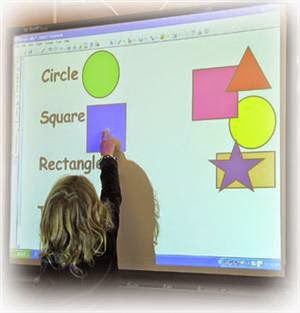
 Mason uses an iPad and the Smart Board to increase his learning. The iPad allows Mason to participate in fun games and learning exercises that teach him how to read and spell. There are many apps that allow students to listen to words and spell using the sounds, so that they do not really have to see what is happening to learn. The Smart Board, since it is so big, allows a visually impaired student like Mason to be able to participate and actually know what is happening on the screen.
Noah- Speech recognition software
In my research I came across a few technologies that are designed to help physically handicapped students, but one stuck out because it is something that would help people like me with forms of dyslexia. Speech recognition software was designed to help use a computer without using the traditional mouse and keyboard. Software like “Dragon” can recognize sounds spoken by the user and convert them into commands for the computer. This allows someone with limited use of their hands to operate a computer with their voice. This allows people with limb abnormalities or amputations to be free of the need for an aid to do the typing for them.
Using this software one can also dictate to the computer what they wish to type. This can help not only the people who find it hard or impossible to type but also those that have problems spelling, like those with Dyslexia. These programs are almost 100% accurate when it comes to spelling and recognizing speech. This allows them to make up for their handicaps.
Speech recognition may not be in itself a learning tool but it levels the playing field so that those with the inability to use a computer normally can have a way to do it on their own without help. This is not only a tool for school work but also for the real world that is now run by computers.
Sources:
Melissa- AT for the Deaf and Hearing impaired student.
During my search for assistive technologies available for the hearing impaired or Deaf this disability was often paired with blindness as well. It was explained that both of these disabilities account for the smaller part of the disabled population so maybe that is why they were often paired together. Another reason could be that a lot of times when a person has one disability it can be accompanied by another or sometimes multiple disabilities reside within one person. At any rate I concentrated on the Deaf. The Deaf community and members within consider it offensive to call them hearing impaired or to say that they have suffered a loss of hearing. They consider ASL (American Sign Language) to be their native language and English their second language. Some do not speak by choice however most of the Deaf learn to speak in order to effectively communicate with the general public.
I will move from older to newer technologies as some of the older ones will still be in use but not for long I am sure as smartphones are getting smarter every day.
In the classroom setting the interpreter was at one time the only way a teacher could communicate effectively with a Deaf or hearing impaired student. The interpreter stands to the left and a little bit behind the teacher and signs what the teacher says in sign language for the Deaf student to see and understand.
Hearing aids can be used by some students with hearing impairment however, do know that the aids amplify ALL of the sound including background noise which could still make it difficult for the student to hear the teacher. Use of FM systems (the same kind as presidential security or McDonald's drive through) where the teacher wears a mini microphone and the student wears a pair of headphones is extremely useful in these cases because the student hears ONLY the teacher.
Sidekick is a mobile communication device that allows the user to receive Instant Messages (IM) and Email. Of course this device is being replaced by the cellphone.
Video instruction and televised announcements with closed captioning can be effective tools. The student can pause or review any forgotten or missed parts of the video instruction avoiding misunderstood questions or answers due to language/communication barriers.
Photo experience books created by the student offer a visual tool to communicate personal experiences with a hearing person without the use of spoken language.
Power point presentations are great for the hearing impaired and Deaf students. It is a computer program that is offered through Microsoft. The program allows the teacher to add pictures and text to slides eliminating the need for the student to hear what is being said.
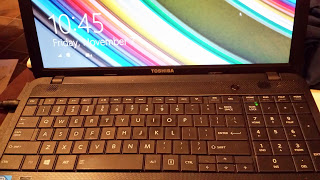
A vocalization to visualization tool is available for free through a computer program called Winamp media player. A microphone is used and auditory sound is turned into visual fireworks on the computer monitor. This is used to represent the sound that is going on in the room as well as to teach the Deaf student how to speak.
The top assistive technology by far within the Deaf community is the smartphone and texting. The junior high and high schoolers especially like this because it completely eliminates the need to speak. They can communicate clearly and just as quickly with text as their hearing peers.
All of these technologies can and are used in real world situations and like I said earlier the smartphone is quickly replacing a lot of these technologies as I type.
Sources:
Tori - Today I am going to share with you an app called Proloquo2Go that is available on iTunes. This is an app that gives a voice to people who can not speak through the use of symbols. This is an amazing tool for kids who have trouble with verbal communication. Instead of trying to guess what they want or need, they can click on the appropriate symbols to tell you exactly what they want. When a symbol is clicked, it says the words out loud on the app as well. In this video, you will meet a 10 year-old boy named Nick. He was diagnosed with Autism and has trouble with his verbal communication. The video shows his mother and other people who work with Nick through out the day using Proloquo2Go and they talk about how it has drastically changed the ease in which they communicate. Nick will often try to verbalize what he wants but when/if it does not happen he uses his iPad to press the symbols which make sentences stating what it is he wants, needs, or feels. Most of the time he will also repeat what the app says which is strengthening his verbal communication skills. The app is availiable on the app store for $219.99. That may seem like a lot of money for one app but when it comes to being able to communicate with a child and the child better communicating with the world, I believe it is worth every penny. If you visit Proloquo2Go, read the reviews from people who have bought it. They all have touching stories about having children or students with disabilities of all kinds whose lives have been made so much easier because of this amazing app that enables them to communicate more effectively.

Assistive Technology for Students with ADHD By: Chelsea Power


C4T #3
 The Library Girl
Jennifer LaGarde (aka library girl!) is a Librarian Ambassador and Education Road Warrior! As an Educator on Loan for the NC Department of Public Instruction, she travels across the land working with school librarians, classroom teachers, principals, superintendents - literally ANYONE who needs help building or making the most of a 21st century school library.
10/26: 27 Ways to Make This the Best Year Ever
Ms. LaGarde's post this week is all about how to enjoy teaching and keep it fun for you and the students. LaGarde gives tips and tricks on how to make the year enjoyable and how not to get burned out on doing the same thing semester after semester, year after year. My comment is, I'm assuming, still under moderation. I simply told Ms. LaGards how much I am liking her blog and that I really got a lot of knowledge and encouragement out of her post. As a future teacher, I worry about what will happen if I am to get tired of it, or just plain fed up with it. She, however, has given me courage to move along and not worry about it to much, I'll cross that bridge when I come to it!
11/9: The Art of Listening
Ms. LaGarde's post is about listening and learning about what other teachers have to say. LaGarde discusses how she had a meeting with the other teachers and asked, as the librarian, how she could get teachers to believe that coming to the library is a good use of instruction time. She got back very good and thoughtful answers, but she was surprised to see that so many of them started off by thanking her for asking their opinion. People just want to be listened to, and teachers are people too! My comment stated that I appreciated The Library Girl's acknowledgment that teachers really and truly appreciate being listened to.
Sunday, November 2, 2014
Blog Post #11
What Can We Learn About Teaching and Learning from These Teachers?

Brain Crosby, in his TEDx Talk, mentions several times about his students "thinking outside of the box". This is something I struggled with throughout my school career. Not many of my teachers encouraged me to think outside of the box, just to get good grades and stay in school. As a result, I did not enjoy school too much. I want that to be different for my students. I want them to look forward to my class and be excited when they come in the door, ready to learn. I will have to spend some time coming up with fun and creative activities so my students can think outside of the box more. I think having the capabilities that technology gives will be a great way to spark interest and excitement in students.
In Paul Anderson's video, Blended Learning Cycle, I learned that it is always a good thing to be able to stay on track with teaching. My greatest fear is that I will come up with a lesson plan, and then take forever and a day to actually execute it with my students. I am going to have to become a better time manager so I can teach in an accurate manner, in the most time efficient way possible. Mr. Anderson gives a good acronym to help stay on track. He uses the word :QUIVER.
Question
Ivestigation/Iquiry
Video
Elaboration
Review
Mark Church has some good ideas about group learning and group work in his Making Thinking Visible video. I like that he split his students up into small groups and let them discuss what they wanted their banners to say. Everyone is going to have different theories and ideas, and combinations of those differences sometimes come up with the best responses. I am going to incorporate group learning into my classroom, definitely. Also, displaying student's work makes them try harder on the assignment because they know others will be looking at it. It will also show students that I approve of their work and they will get a sense of accomplishment to see their work displayed in the room or in the hallway.
 Sam Pane teaches his students about digital safety in his video, Super Digital Citizen. I tend to take for granted that students are going to come to school knowing how to safely use the internet. I realize now that is not so, and they will more than likely need some assistance in that matter. What better way to learn than to make a comic about a Digital Citizen superhero? No matter how old or how young a student is, superheroes are always a huge hit. Then we are having fun as well as learning important subject in the classroom. If I am going to require my students to use technology in our classroom, I need to teach them how to be safe while they use it before we do anything involving technology.
Dean Shareski's video, Project Based Learning, is a great example of how different subjects can be easily blended together. I would love to partner with different teachers and complete projects that involve everyone. I think the students will get more learning and understanding out of the project and as teachers, we will gain some team working skills as we go along. It will be so fun to combine English (my subject matter) with that of History, Math, Science, and any other subjects.
After watching Roosevelt Elementary's PBL Learning I have picked up on a theme that I will now remember throughout my teaching career. That theme is: Always make sure that the students are engaged. Now that I know this and realize it, I am going to use it, Engaging students is going to make sure they enjoy what they are learning and will retain what they have learned. If they are engaged and participating, I will know that I am doing my job correctly. PBL makes it possible for students to become fully involved in the lesson and the teacher is not just simply standing in front of them and lecturing information for them to just spit back out for a test and then forget it. PBL lets students apply what they have found out to real-life situations, showing them value in what they are learning. I now see the extreme worth in PBL and look forward to basing my teaching off of it.
In Paul Anderson's video, Blended Learning Cycle, I learned that it is always a good thing to be able to stay on track with teaching. My greatest fear is that I will come up with a lesson plan, and then take forever and a day to actually execute it with my students. I am going to have to become a better time manager so I can teach in an accurate manner, in the most time efficient way possible. Mr. Anderson gives a good acronym to help stay on track. He uses the word :QUIVER.
Question
Ivestigation/Iquiry
Video
Elaboration
Review
Mark Church has some good ideas about group learning and group work in his Making Thinking Visible video. I like that he split his students up into small groups and let them discuss what they wanted their banners to say. Everyone is going to have different theories and ideas, and combinations of those differences sometimes come up with the best responses. I am going to incorporate group learning into my classroom, definitely. Also, displaying student's work makes them try harder on the assignment because they know others will be looking at it. It will also show students that I approve of their work and they will get a sense of accomplishment to see their work displayed in the room or in the hallway.
Sam Pane teaches his students about digital safety in his video, Super Digital Citizen. I tend to take for granted that students are going to come to school knowing how to safely use the internet. I realize now that is not so, and they will more than likely need some assistance in that matter. What better way to learn than to make a comic about a Digital Citizen superhero? No matter how old or how young a student is, superheroes are always a huge hit. Then we are having fun as well as learning important subject in the classroom. If I am going to require my students to use technology in our classroom, I need to teach them how to be safe while they use it before we do anything involving technology.Dean Shareski's video, Project Based Learning, is a great example of how different subjects can be easily blended together. I would love to partner with different teachers and complete projects that involve everyone. I think the students will get more learning and understanding out of the project and as teachers, we will gain some team working skills as we go along. It will be so fun to combine English (my subject matter) with that of History, Math, Science, and any other subjects.
After watching Roosevelt Elementary's PBL Learning I have picked up on a theme that I will now remember throughout my teaching career. That theme is: Always make sure that the students are engaged. Now that I know this and realize it, I am going to use it, Engaging students is going to make sure they enjoy what they are learning and will retain what they have learned. If they are engaged and participating, I will know that I am doing my job correctly. PBL makes it possible for students to become fully involved in the lesson and the teacher is not just simply standing in front of them and lecturing information for them to just spit back out for a test and then forget it. PBL lets students apply what they have found out to real-life situations, showing them value in what they are learning. I now see the extreme worth in PBL and look forward to basing my teaching off of it.

Project #14, Project Based Learning Plan #2
Weather
With this Lesson Plan the students will learn about different types of weather, how to observe the sky and nature to pick up on some clues, and the seasons. They will also learn how to protect themselves from inclement weather. This will be accomplished through guided self observations along with videos and guest speakers. The students will also be collaborating with each other and discussing daily weather changes. Art will also play an exclusive and very important role of the learning experience along with fun, engaging games to help the students remember key points.


Sunday, October 26, 2014
iTeach and iLearn
Hey Edm310!
I've been reading and following David Mulder's blog, iTeach and iLearn, for a couple of weeks now. He has some really good tips and tricks for technology and using it to teach in the classroom. His most recent post is all about "Netiquette" which is the etiquette of the Internet world! If you get the chance, take some time and read some of his posts-they're really awesome and have a lot to do with what we are learning in our class.

Blog Post #10
What Can We Learn from Ms. Cassidy?
 Watching Ms. Cassidy's video, Little Kids...Big Potential, showed me that students as young as first grade are really enthusiastic about using technology in their classrooms, it's not just the teachers. I really liked the usage of the Nintendo DS and the Nintendogs game, and not only because I love the game myself. I never would have thought about using a video game to teach students about responsibility and team work. I think I could very easily implement this in my classroom, even though I am planning to teach in a high school setting. High school students may first view playing a Nintendo game as child-like, but I am fairly certain they will enjoy the act very quickly, especially after we make it into a classroom competition. They will be getting teamwork experience without even really knowing it!
 In the video interview Dr. Strange did with Ms. Cassidy, Cassidy 13 Part 1, Ms. Cassidy talks about having a technology coordinator. Now, I know this isn't something I can really use in the classroom setting, but I think it is vital to have someone in charge of all the technology if you are going to be heavily using it during school. One person that can keep up with the ever changing technology and handle any sorts of questions or problems that may occur while using technology. At my mom's elementary school, they have a technology board. One teacher from each grade level is chosen or volunteers to meet with the group so they can learn new techniques and share ideas with each other. They then go back and talk about these new things with the others on their grade level. I think have some people or a person in charge of the technology will make it easier and less stressful to use for teachers, especially those wary of technology in the first place.
 In the video interview Dr. Strange did with Ms. Cassidy, Cassidy 13 Part 3, Ms. Cassidy talks about blogging depending on the year and what type of students and resources she has available. Watching this interview, I am thinking more about how I can use blogging in my own classroom. As an English teacher, my students can make book trailers and presentation about what they have read, and then post it on their class blog so I can grade it that way and leave feedback, Other students can also leave feedback and suggestions for their fellow classmates. I can have one major class blog to post reminders and assignments for students so they do not have to worry about losing the piece of paper they may have written the assignment on. The only problem I might face with this is students that do not have access to a computer or tablet at home, in which case I will have to make sure the give them plenty of time to work on assignments during class-which will just give me more of an opportunity for group work!
Watching Ms. Cassidy's video and interviews have certainly opened my eyes to the benefits of technology in the classroom, and has showed me how much students actually enjoy using it. I'm looking forward to incorporating technology into my classroom someday!

Subscribe to:
Posts (Atom)